How It Works
LiquidFiles is a server you install in your environment. Here's a typical file transfer flow:
1
Upload and send — Jenny in marketing visits her company's LiquidFiles server, logs in with her AD credentials, attaches the files, enters the recipient's email and clicks send.
2
Recipient notified — Joe receives an email with a secure download link.
3
Authenticated download — Joe clicks the link, verifies his email, and downloads the files over HTTPS. No account required.
4
Delivery confirmed — Jenny receives a download receipt confirming Joe received the files, including when, where and how.
The Send Interface
The interface works like webmail — intuitive for anyone who has ever sent an email.
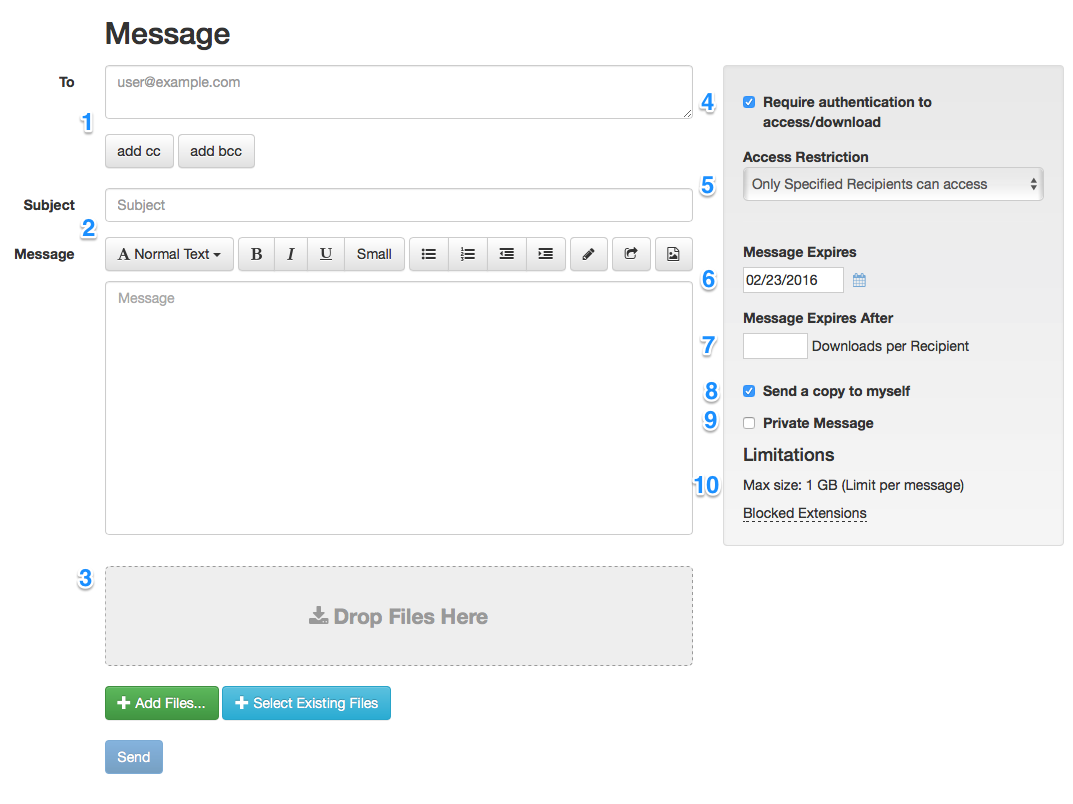
- Add as many recipients as needed, with CC and BCC support
- Sender aliases — send from shared or role-based addresses
- Subject and message body, just like email
- Drag-and-drop files or reuse previously uploaded files
- Choose authentication requirements per message
- Control who can access: specified recipients only, local users, or anyone after authentication
- Set expiration date — files are automatically cleaned up
- Limit downloads per recipient
- Send yourself a copy for your sent folder
- Private message mode — body not included in notification, plus read receipts
- Admin-configurable size limits and file type restrictions per user group
Download Tracking
Every download is logged with geo-location, device information, browser, speed and timestamp — giving you complete visibility into what happened with your data. The Download Details page will look similar to the following.
Download Details
| Recipient | joe.smith@example.com |
|---|---|
| Filename | Project_Research_Data_Q1.zip (4.7 GB) |
| Checksum (SHA256) | e3b0c44298fc1c149afbf4c8996fb92427ae41e4649b934ca495991b7852b855 |
| Downloaded at | — |
| Download Speed | 12.4 MB/s |
| Download Time | 06m 19.35s |
| From | — |
| Location | — |
| Browser | — |
| Platform | — |
| Operating System | — |